Figure 1
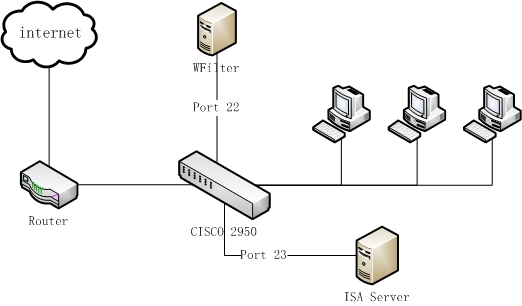
An office uses ISA server 2004 as the proxy server, with a cisco 2950 switch as the central switch. The network topology diagram:
There have two solutions to deploy WFilter in such a network:
Please notice: Because WFilter only analysis traffic between local network and the internet, to monitor local proxy servers, you need to add the proxy server ip address to "Local Servers" in "System Settings"->"Monitoring Settings".
In this example, the proxy server is connected "Port 23", WFilter computer is connected to "Port 22". To monitor all internet traffic, we need to mirror "port 23" to "port 22".
monitor session session_number {destination {interface interface-id [, | -] [encapsulation {dot1q}] [ingress vlan vlan id] | remote vlan vlan-id reflector-port interface-id} | {source {interface interface-id [, | -] [both | rx | tx] | remote vlan vlan-id}}
By default the mirroring port of cisco 2950 is recv-only. However WFilter shall be able to send packages to for blocking purpose. So in this example, we add "ingress vlan 1" parameter to enable outgoing traffic on port 22. If your switch does not support "ingress" parameter, you need to add another NIC as the blocking adapter.
To check whether port mirroring is properly configured, please check: How to check whether port mirroring is properly configured?
For more WFilter deployment examples, please check: WFilter Deployment Examples.